Why Most CRMs Fail Modern Customer Experience — And How AI-Native Platforms Are Replacing Them
Legacy CRMs are breaking under modern CX demands. Discover why AI-native platforms like Uniconnect are replacing them — and how to make the switch without the risk.
Jun 1, 2026Uniconnect Editorial Team
Most CRMs were built for sales pipelines, not customer service operations. As channels multiplied and customers demanded faster, more contextual service, legacy CRM architectures became structural liabilities. AI-native platforms resolve this by embedding intelligence, unification, and automation into a single operating layer — replacing the fragmented stacks that erode CSAT and inflate costs.
Key data points:
• 67% of CRM projects fail to deliver expected ROI (Gartner)
• Legacy environments average 4–6 tool switches per agent interaction
• AI-native platforms reduce AHT by 20–40% through unified context
• Companies with unified CX platforms achieve 1.8x higher retention
• Uniconnect AI operates across all modules as a single intelligence layer
• Measurable ROI from AI-native migration is typically visible within 90 days
Best for: Contact center leaders, CX directors, IT decision-makers evaluating CRM modernisation
Most relevant Uniconnect AI feature: Unified Omnichannel Inbox + Uniconnect AI Copilot
Implementation complexity: Medium — 8–16 weeks with no-code configuration
Your agents have three browser tabs open. A customer is on hold waiting for account information that exists somewhere between the CRM, the ticketing system, and the billing platform — but none of these talk to each other in real time. The agent types notes in one system, logs the interaction in another, and escalates into a third. The customer, experiencing none of this internal complexity, simply experiences being kept waiting.
This is not a process failure. It is an architectural one.
The CRM platforms most organisations rely on were designed in an era when customer service meant answering emails and managing contact records. They were built for salespeople tracking pipelines, not support teams navigating live, multi-channel, high-stakes customer interactions. And while these platforms have acquired AI features and added channel integrations over the years, the underlying architecture remains fundamentally the same — relational databases, linear workflows, and retrospective reporting.
Modern customer experience does not operate on any of those foundations.
This article examines precisely where legacy CRM fails, what the industry is doing about it, and how AI-native platforms — built from the ground up for the demands of 2026 — are replacing the systems that were never fit for purpose.
The Problem: Why Legacy CRM Was Never Built for This
Customer experience has changed more in the past five years than in the previous two decades. Customers now contact organisations across voice, live chat, WhatsApp, email, social DMs, and self-service portals — often switching between channels mid-interaction. They expect agents to have full context immediately. They expect resolution in a single conversation. And they have zero tolerance for repeating themselves.
Legacy CRM cannot deliver this. The reasons are structural, not cosmetic.
The silo problem runs deep. Most enterprise CRM deployments connect to between five and twelve external systems — ticketing platforms, telephony providers, billing systems, product databases, marketing automation tools. Each integration introduces latency, maintenance overhead, and data inconsistency. When a customer contacts support, the agent is not looking at a customer — they are stitching together a picture from four different windows while the customer waits.
Real-time intelligence is absent. Traditional CRM records what happened. It does not advise on what to do next. During a live call, an agent using a legacy CRM has access to historical notes and basic account data — but no AI surfacing the likely reason for the call, no next-best-action guidance, no sentiment signal indicating the customer is about to escalate. The agent is navigating without instruments.
The channel layer is bolt-on by design. Most legacy CRM platforms added omnichannel capabilities through acquisitions or third-party integrations. WhatsApp is a separate module. Voice requires a telephony connector. Chat runs through a different provider. Each channel maintains its own data model. The result is a customer who called yesterday and messaged today — and an agent who sees two entirely separate interactions with no connective tissue.
“We had six different systems for six different channels. Our agents knew everything about the product and nothing about the customer.”
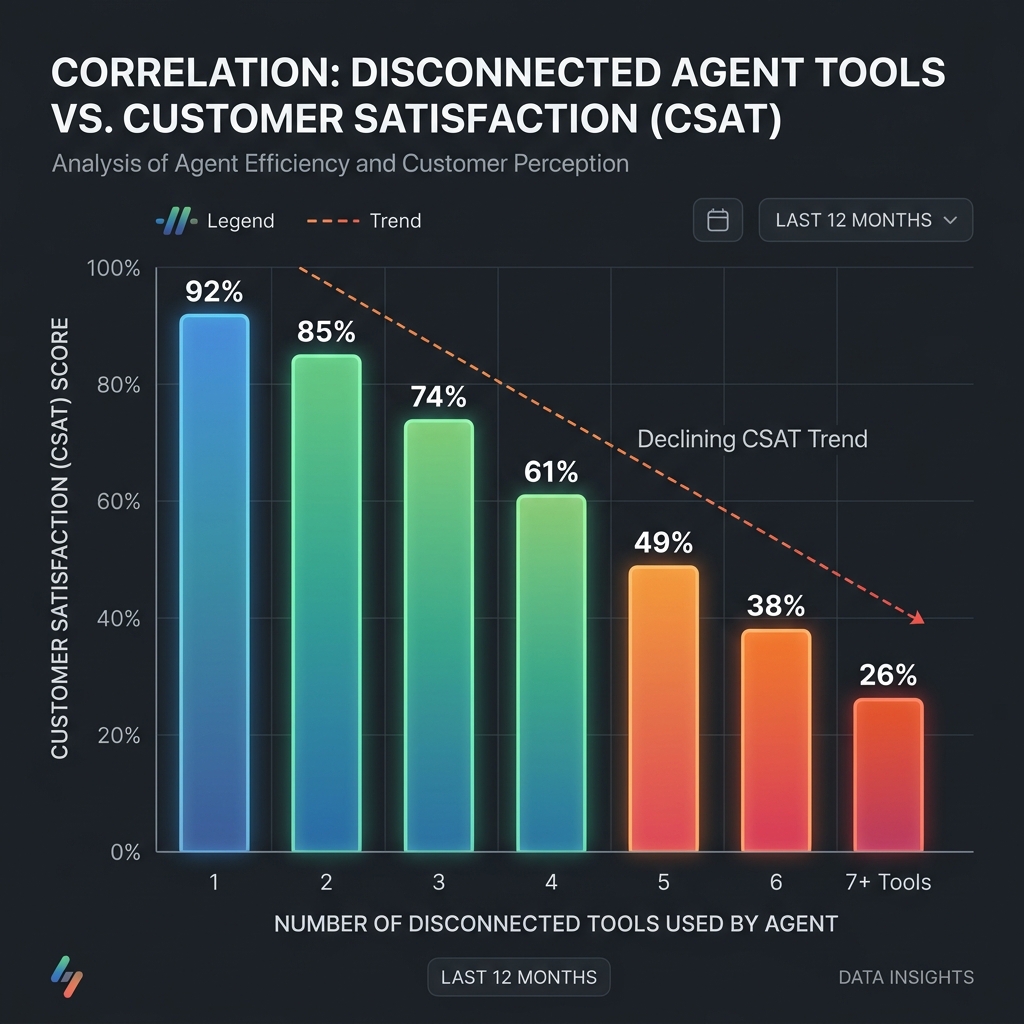
CSAT Decline Chart
The business cost of this architecture is measurable. Average handle time increases when agents lack unified context. First contact resolution rates decline when agents cannot access complete customer history. Escalations multiply when AI cannot intervene early enough. And customer effort scores — the single strongest predictor of churn — climb steadily as fragmentation compounds.
Gartner estimates that fragmented CX technology stacks cost organisations between 15–25% in avoidable operational spend annually. For a mid-sized contact center, this is not a rounding error. It is a strategic liability.
The Landscape: What Forward-Thinking Companies Are Doing Differently
Unified architecture over integration stacks: Leading organisations are consolidating from fragmented stacks into single platforms that handle CRM, contact center, AI, and analytics natively. The goal is not a better integration — it is the elimination of integration as a dependency.
AI as infrastructure, not feature: The most significant shift is conceptual: AI is no longer evaluated as a feature sitting on top of a CRM. It is evaluated as the operating layer of the entire platform. This means AI that runs during every agent interaction, not just when a supervisor pulls a report.
No-code configurability as a competitive advantage: Organisations that can reconfigure customer workflows without engineering tickets move faster than those that cannot. No-code CRM architecture has shifted from a convenience to a strategic differentiator — particularly in industries where compliance, product configurations, and customer segments change regularly.
• Real-time AI: Absent or bolt-on (Legacy) vs AI active on every interaction (AI-Native)
• Customer profile: Fragmented (Legacy) vs Single unified record (AI-Native)
• Automation: Rule-based (Legacy) vs Intent-driven AI workflows (AI-Native)
• Reporting: Historical (Legacy) vs Real-time with AI insights (AI-Native)
• Customisation: Requires engineering (Legacy) vs No-code configuration (AI-Native)
• Implementation: 12–18 months (Legacy) vs 8–16 weeks (AI-Native)
• Cost structure: High TCO with stacking integrations (Legacy) vs Consolidated platform cost (AI-Native)
Core Concepts: Where Exactly Does CRM Break?
1. The Unified Customer Profile Problem: Legacy CRM stores customer data in relational tables optimised for query performance, not for real-time assembly. When an agent opens a customer record, the system may pull from three or four internal databases — and if any channel data lives in an external system (telephony, chat platform, WhatsApp), that context is absent entirely. The agent sees an incomplete picture, and the customer pays the price.
2. The Channel Fragmentation Problem: Adding a WhatsApp channel to a legacy CRM typically means deploying a separate middleware layer, maintaining a separate message thread database, and building a custom integration to pull conversation history into the main CRM view. Each new channel multiplies this complexity. By the time organisations have five or six channels active, the integration burden is significant enough that maintenance consumes more resource than new development.
3. The Real-Time Intelligence Gap: This is perhaps the most significant structural gap. During a live customer interaction — whether voice, chat, or messaging — a legacy CRM offers no real-time assistance to the agent. There is no AI listening to the conversation and surfacing relevant knowledge base articles. There is no sentiment analysis flagging escalation risk. There is no next-best-action engine suggesting how to resolve the query faster. The agent operates on memory and manual lookup.
4. The After-Call Work Problem: Agents using legacy CRMs spend between 15–30% of their time on after-call work — manually entering notes, updating records, tagging interactions, and filing dispositions. This is time not spent with customers. AI-native platforms automate post-interaction summarisation, reducing ACW from minutes to seconds.
5. The Supervisor Visibility Problem: Contact center supervisors using legacy systems monitor performance retrospectively — through reports that reflect what happened, not what is happening. Real-time queue management, live sentiment monitoring, and intervention capabilities require a separate workforce management layer, adding yet another integration point.
6. The Automation Ceiling: Legacy CRM automation is rule-based. It can trigger an email when a ticket status changes. It cannot understand customer intent, predict next contact, route intelligently based on emotional context, or autonomously resolve queries that fall outside predefined scripts. Rule-based automation has a ceiling. AI-native automation does not.
7. The Data Quality Decay Problem: Because legacy CRMs require agents to manually update records, data quality degrades over time. Duplicate records, missing fields, outdated contact information, and inconsistent tagging accumulate at scale. AI-native platforms use active enrichment — continuously updating records based on interaction signals — rather than relying on agent compliance.
8. The Total Cost of Ownership Problem: CRM licensing is rarely the primary cost. Integrations, customisations, third-party AI tools, additional analytics platforms, and specialist consultants stack up quickly. Organisations running mature legacy CRM deployments often discover that their actual CX platform cost — when all dependencies are counted — is two to three times the base license fee.
How Uniconnect Solves This
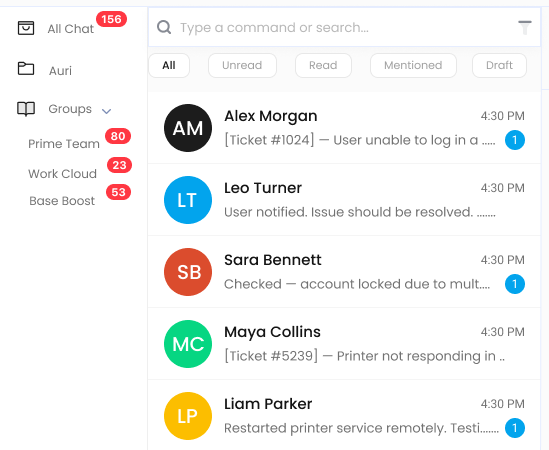
The Unified Omnichannel Inbox:
Unified Omnichannel Inbox
Gives every agent a single interface for voice calls, live chat, WhatsApp conversations, email threads, and social messages — with full customer history visible across all channels simultaneously. There are no tabs to toggle, no external systems to check, no context to reconstruct. The agent sees the customer's full interaction history the moment the conversation opens.
Uniconnect AI Copilot:
Uniconnect AI Copilot Interface
Operates in real time during every interaction. As a customer explains their issue, Uniconnect AI surfaces relevant knowledge base content, previous case resolutions, next-best-action suggestions, and sentiment signals — without the agent asking. When the interaction ends, Uniconnect AI generates an automatic post-interaction summary, eliminating manual after-call work and ensuring data quality without relying on agent compliance.
Uniconnect AI Agents: Can handle Tier-1 queries autonomously — responding to customer messages across WhatsApp, chat, and email without human involvement. When complexity exceeds the agent's parameters, the handoff to a human agent includes the full conversation context, so the customer never repeats themselves.
The No-Code CRM: Allows operations teams to create custom entities, configure workflows, build automations, and set up routing rules without engineering tickets. When a regulation changes, a new product launches, or a campaign requires a new data field, the change is made in hours, not weeks.
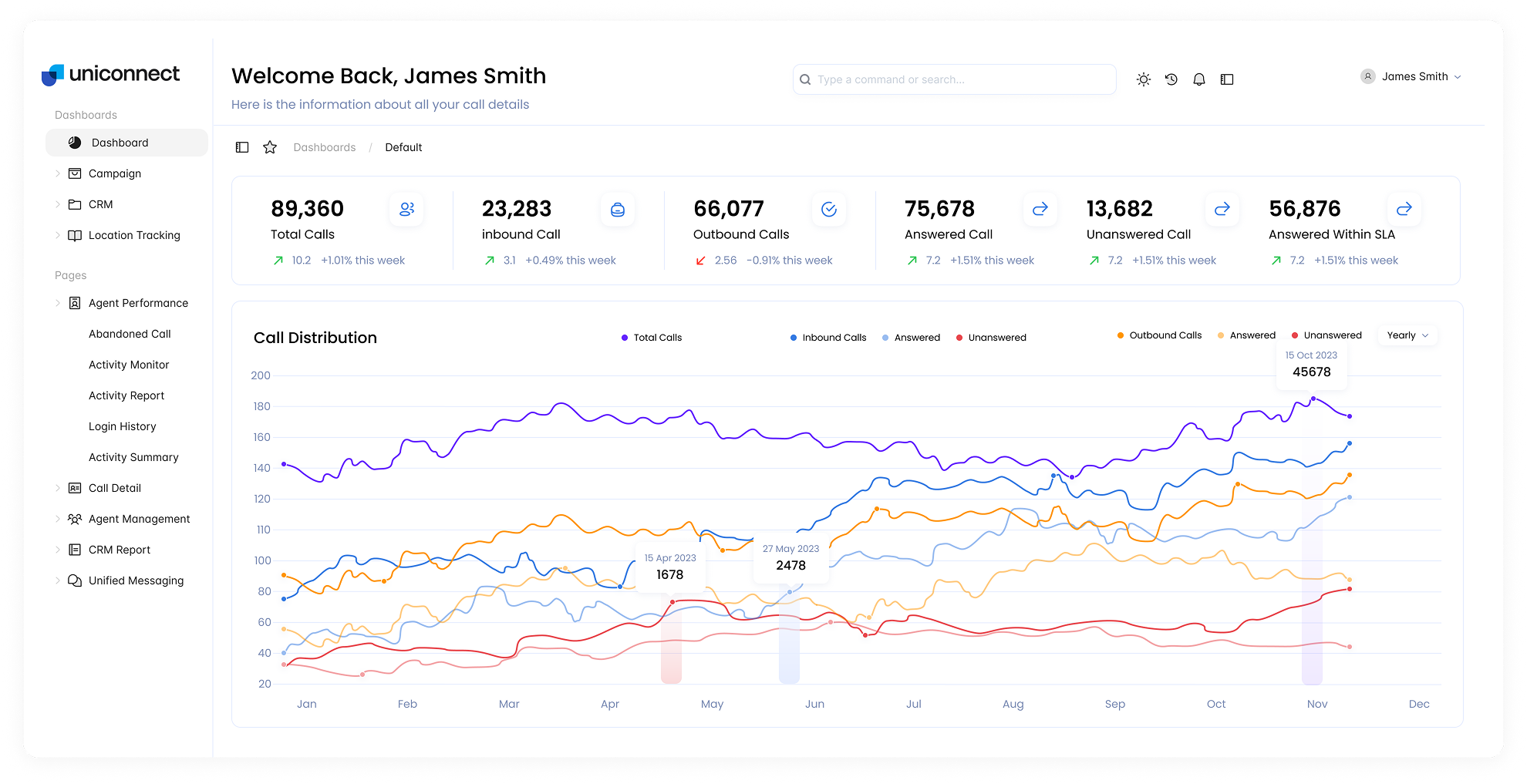
Real-Time Business Intelligence: Powered by Uniconnect AI gives supervisors live dashboards showing queue status, agent performance, sentiment distribution, and predicted SLA breaches — before they happen. Intervention becomes proactive, not reactive.
Scenario: Regional Insurance Company
A regional insurance provider running a mid-sized contact center had agents averaging 8 minutes of handle time per claims enquiry. After migrating to Uniconnect AI, Uniconnect AI Copilot reduced the information retrieval time within each call by automatically surfacing policy details and previous claim history as the customer identified themselves. After-call work dropped from 4 minutes to under 60 seconds with Uniconnect AI's automated call summary. Within 90 days, average handle time had dropped to 5.2 minutes — a 35% reduction — and CSAT scores improved by 12 points.
Implementation Guide: How to Get Started
Weeks 1–2 – Phase 1: Audit and Baseline
Map every system that currently holds customer data. Document all active integrations and their dependencies. Establish baseline KPIs — AHT, FCR, CSAT, ACW, escalation rate — so ROI can be measured objectively after migration.
Weeks 3–5 – Phase 2: Platform Configuration
Work with the Uniconnect onboarding team to configure the no-code CRM to match your existing data model. Set up the unified inbox with all active channels. Define routing rules and AI agent parameters. Import historical customer data.
Weeks 4–6 – Phase 3: AI Configuration
Train Uniconnect AI on your knowledge base, product catalogue, and resolution playbooks. Configure AI agent boundaries — which query types it handles autonomously, which it escalates. Set up Uniconnect AI Copilot triggers aligned to your most frequent interaction types.
Weeks 6–9 – Phase 4: Pilot
Run a 30-day pilot with a single team or channel. Track KPIs daily. Gather agent feedback on workflow friction points. Adjust AI parameters based on real interaction data.
Weeks 9–14 – Phase 5: Staged Rollout
Expand channel by channel, team by team. Maintain legacy CRM access during transition for fallback. Train supervisors on real-time BI dashboards.
Weeks 14–16 – Phase 6: Full Deployment and Legacy Decommission
Complete migration of all teams and channels. Retire legacy CRM access. Consolidate licensing costs. Begin optimisation cycle based on Uniconnect AI insight data.
Stakeholder alignment tip: The most common point of failure in CRM migrations is not technical — it is organisational. Ensure IT, CX operations, compliance, and frontline team leads are involved in Phase 1 scoping. Resistance discovered after configuration is far more costly than resistance addressed in the audit phase.
Industry-Specific Applications
Banking & Insurance: Claims and account service teams in financial services operate under two simultaneous pressures: regulatory compliance and customer experience expectations. Legacy CRM creates audit trail gaps when interactions span multiple channels. Uniconnect's unified interaction record gives compliance teams a single source of truth for every customer touchpoint, while Uniconnect AI reduces the average time agents spend retrieving policy details — the single largest contributor to handle time in insurance contact centers.
Healthcare: Patient service centres in healthcare face strict data governance requirements alongside high emotional sensitivity in every interaction. Uniconnect's no-code CRM allows healthcare operators to configure patient record structures without engineering dependency, while Uniconnect AI agents can handle appointment confirmations, prescription enquiry routing, and post-visit follow-ups — reducing inbound volume without reducing care quality.
Retail & Ecommerce: Peak volume periods — sale events, holiday seasons, product launches — expose the limits of CRM architectures that cannot scale intelligently. Uniconnect's AI agents absorb order tracking, return request, and delivery query volume autonomously, allowing human agents to focus on complex complaints and high-value customer relationships. Real-time BI dashboards give operations managers live queue visibility during peak periods.
Contact Centers & BPOs: BPOs face a unique CRM challenge: they run multiple client programmes, each with different data models, workflows, and compliance requirements, on a single platform. Uniconnect's no-code CRM supports multi-client configurations with isolated data environments, separate routing logic, and configurable Uniconnect AI parameters per programme — without requiring separate platform instances.
Travel & Hospitality: Travel CX operates on urgency. A passenger with a disrupted flight has a very short window of patience. Uniconnect's unified inbox ensures that when a customer switches from WhatsApp to voice mid-interaction — which travel customers do constantly during disruption events — the agent sees the complete message history immediately, without the customer re-explaining their situation.
Seven Mistakes to Avoid
Mistake 1: Evaluating AI as a CRM Feature. If you assess a platform's AI capability based on a feature checklist — sentiment analysis, chatbot, suggested responses — you will underestimate the difference between AI as a feature and AI as architecture. Ask: is AI running on every interaction, or only when enabled? Is it passive (reporting) or active (intervening)? Business impact: Organisations that adopt CRM platforms with bolt-on AI continue to experience the same AHT and FCR problems. They pay AI premiums for marginal gains. How to avoid: Require a live demonstration of AI operating during an unscripted customer interaction — not a scripted demo with pre-configured triggers.
Mistake 2: Migrating Data Without Auditing It First. Customer data in legacy CRMs is rarely clean. Duplicate records, abandoned contacts, inconsistent tags, and missing fields accumulated over years will migrate with your data unless explicitly addressed. Migrating dirty data into a new platform does not create a unified customer profile — it creates a more expensive version of the same problem. Business impact: AI accuracy suffers when trained on low-quality data. Agents lose trust in automated suggestions when the underlying data is unreliable. How to avoid: Dedicate at least 20% of migration timeline to data audit and cleansing before any platform configuration begins.
Mistake 3: Running All Channels Simultaneously at Go-Live. Migrating voice, chat, WhatsApp, email, and social simultaneously creates maximum operational risk at the worst possible moment. A configuration error on one channel during a high-volume period can cascade. Business impact: Service disruptions at go-live erode agent confidence and give internal stakeholders reason to question the migration decision. How to avoid: Migrate channels in priority order, with the highest-volume or highest-risk channel going live last after the team is fully trained on the platform.
Mistake 4: Defining AI Agent Boundaries Too Broadly. There is a temptation to automate as much as possible as quickly as possible. AI agents deployed without clear boundary parameters will attempt to resolve query types they are not yet trained for, producing inaccurate responses that damage customer trust. Business impact: A single poorly handled AI interaction can generate multiple complaints and require human recovery time disproportionate to the volume saved. How to avoid: Start with Tier-1 high-volume, low-complexity query types — order tracking, appointment booking, FAQ responses. Expand boundaries based on confidence score data, not calendar targets.
Mistake 5: Ignoring Agent Change Management. Agents who do not understand or trust AI copilot tools will ignore them. Training that explains what Uniconnect AI does but not why it makes the agent's job easier will not produce adoption. Business impact: Platform investment yields diminished returns when adoption rates are low among frontline teams. How to avoid: Involve agents in the pilot phase. Let them experience reduced ACW time and faster resolution before asking them to trust AI suggestions during live calls.
Mistake 6: Treating the Migration as a One-Time Project. An AI-native platform is not a system you configure and leave. The real gains come from continuous optimisation — refining AI agent parameters, adjusting routing logic based on FCR data, updating knowledge bases as products change. Organisations that treat migration as a finish line rather than a starting point leave significant performance gains unrealised. Business impact: Platforms underperform their potential when not actively managed post-deployment. How to avoid: Assign a dedicated platform owner in your operations team responsible for monthly optimisation reviews using Uniconnect AI insight data.
Mistake 7: Measuring Success Only at the Final Go-Live. Waiting until all channels are live and all teams are migrated to declare success — or failure — means waiting months before any course correction is possible. Business impact: Problems that surface in the pilot are cheaper and faster to fix than the same problems discovered six months later at full scale. How to avoid: Define KPI milestones at each phase. Measure AHT, FCR, and CSAT at the end of the pilot. Make go/no-go decisions at each phase gate based on data.
Ready to Fix the Gap?
The gap between your current CRM and what your customers actually experience is measurable — and fixable.
Uniconnect's platform specialists work with contact centers and CX teams specifically to identify where your current stack is creating friction, and what a unified AI-native architecture looks like in your operational context.
Book a personalised platform walkthrough and see Uniconnect in your industry's specific configuration — no generic demo, no sales script.
Why do most CRM implementations fail to improve customer experience?
Most CRM implementations fail because they were designed around internal sales processes, not customer journeys. They create data silos across departments, lack real-time intelligence, and require agents to toggle between multiple disconnected tools during live interactions. The result is slow, fragmented service that frustrates customers and exhausts agents.
What is an AI-native CRM platform?
An AI-native CRM platform is one where artificial intelligence is embedded throughout every module — not bolted on as an add-on. This means AI drives real-time recommendations, automates repetitive workflows, surfaces predictive insights during live interactions, and powers autonomous agents that can handle customer queries end-to-end without human intervention.
How is Uniconnect AI different from traditional CRM software like Salesforce or HubSpot?
Uniconnect AI combines CRM, omnichannel contact center, AI agents, business intelligence, and workforce optimization in a single platform. Unlike traditional CRMs that require separate integrations for each capability, Uniconnect AI gives agents a unified view of every customer interaction across voice, email, chat, WhatsApp, and social — with Uniconnect AI surfacing insights and automations in real time.
What are the signs that your CRM is failing your customer experience?
Key warning signs include: rising average handle time despite more agents, CSAT scores stagnating or declining, agents requiring 3+ screens to resolve a single query, customer data inconsistent across departments, inability to track customer journeys across channels, and lack of real-time supervisor visibility into live interactions.
How long does it take to migrate from a legacy CRM to an AI-native platform?
A phased migration typically takes 8–16 weeks depending on data complexity, integration requirements, and team size. Platforms like Uniconnect AI offer pre-built connectors, no-code configuration, and dedicated onboarding support to reduce implementation time significantly compared to traditional enterprise CRM deployments.
Can AI-native platforms work for regulated industries like banking and healthcare?
Yes. AI-native platforms designed for enterprise use include data governance controls, role-based access management, audit trails, and compliance frameworks that meet the requirements of regulated industries. Uniconnect AI is used across banking, insurance, and healthcare verticals with industry-specific configurations built in.
What business outcomes can companies expect from switching to an AI-native CRM?
Companies migrating to AI-native platforms typically report 20–40% reductions in average handle time, 15–30% improvement in first contact resolution, significant reductions in after-call work, and measurable CSAT improvements within the first 90 days of deployment when configured correctly.
What is Uniconnect AI and how does it enhance customer experience?
Uniconnect AI is our proprietary AI engine that powers autonomous agents, real-time agent copilot assistance, predictive analytics, customer journey intelligence, and campaign audience segmentation. Uniconnect AI operates across all platform modules, meaning AI is not a feature — it is the underlying operating layer of the entire platform.
About This Article
This article was produced by the Uniconnect AI editorial and product team — practitioners with direct experience implementing omnichannel CRM, AI agent deployments, and contact center transformation programmes across contact centers, financial services, healthcare, and retail environments. Uniconnect AI's platform is built on partnerships with OpenAI, Anthropic, and Meta (WhatsApp Business). All performance figures cited reflect documented outcomes from platform deployments and published industry research.
Platform expertise: CRM, AI Agents, Omnichannel Contact Center, Workforce Optimization, Business Intelligence
Reviewed by: Uniconnect AI Product and CX Advisory Team
Your CX Platform Should Be Working for Your Customers, Not Against Them
The CRM that was deployed two, three, or five years ago was the right answer for a different question. Customer experience in 2026 requires real-time intelligence, unified channel context, and autonomous AI that resolves queries before they reach your most experienced agents.
Uniconnect AI was built for this moment. One platform. One unified customer record. Uniconnect AI operating on every interaction.
The teams replacing their legacy CRM with Uniconnect AI are not doing it because change is easy. They are doing it because the cost of staying is now higher than the cost of moving.
See Uniconnect AI in your operational context. Book a personalised platform walkthrough.